![logo_white_text.svg]](https://help.tinkle.co/hubfs/logo_white_text.svg)
To clear voicemail inboxes, you have several options:
Option 1: Dial *97 from the Tinkle App
Dial *97 from your Tinkle app, and enter your PIN. From here, you can then listen to your voicemails, and then select the appropriate option to delete them.
Option 2: Manage from the Tinkle App
Navigate to your dashboard within the Tinkle App.
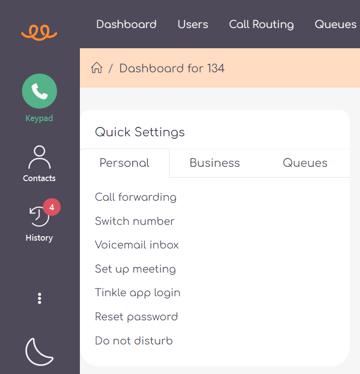
From here, under "Quick Settings", you need to select "Voicemail inbox".
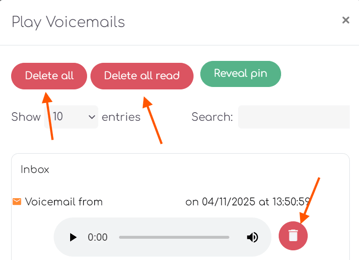
This will open a new, smaller window displaying all current messages within your mailbox, where you can delete all, delete all read messages at once, or remove them individually.
Option 3: Manage from Tinkle Manager (web browser)
Log in to Tinkle Manager (manager.tinkletelecom.com), navigate to the Voicemail page, and select “Play messages.” on your voicemail inbox.

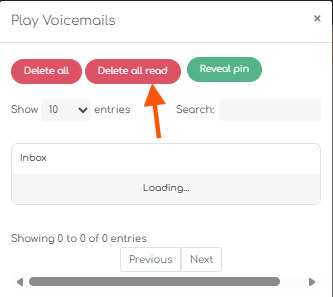
This will open a new, smaller window displaying all current messages within that mailbox, where you can delete all, delete all read messages at once, or remove them individually.
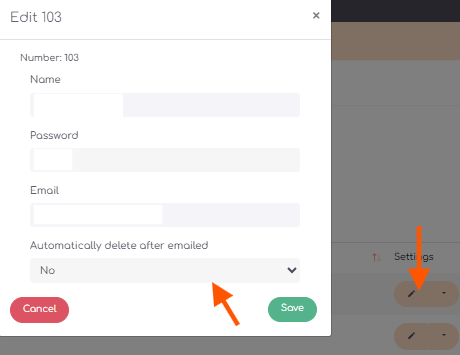
If you listen to your voicemails using the audio files sent by email, you can enable the “Automatically delete after emailed” setting, which will help prevent the voicemail inbox being clogged up with messages you have already listened to via email.