![logo_white_text.svg]](https://help.tinkle.co/hubfs/logo_white_text.svg)
To manage voicemail inboxes, you have several options:
Option 1: Dial *97 from the Tinkle App
Dial *97 from your Tinkle app, and enter your PIN. From here, you can then listen to your voicemails, and then select the appropriate option to delete them if required.
Option 2: Accessing Your Voicemail Inbox from Tinkle Manager or the Tinkle App
You can access your voicemails directly from your dashboard under Quick Settings by selecting Voicemail Inbox, or by using the navigation bar.
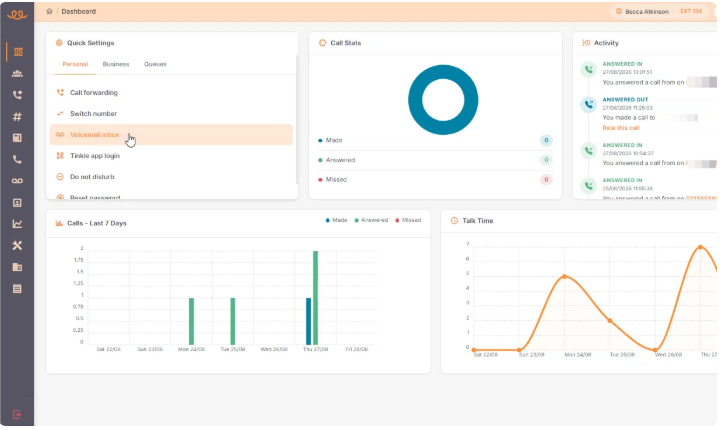
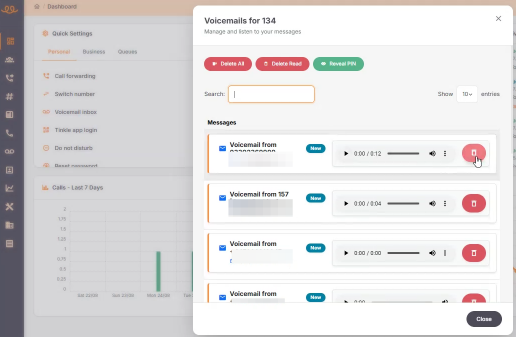
Inside the Voicemail Inbox, you can manage your recordings using the following tools:
- Search: Find specific voicemails by entering a phone number or user name.
- Playback: Play voicemail audio directly in the browser and adjust playback speed via the three dots menu.
- Download: Click the three dots menu on any recording to download the audio file to your device.
- Delete: Remove individual messages, delete all listened messages, or delete all messages at once.
- PIN settings: Review and check your voicemail PIN.

Q: Can I receive voicemail recordings via email?
A: Yes. If you have an email address associated with your Tinkle user account, all incoming voicemails are automatically forwarded to your email as audio attachments.
Q: How do I download a voicemail file or adjust playback speed?
A: Click the three dots icon next to the voicemail message to access options for downloading the audio file and modifying the playback speed.